What Is Clay AI, and How Do You Build a Tool Like It?

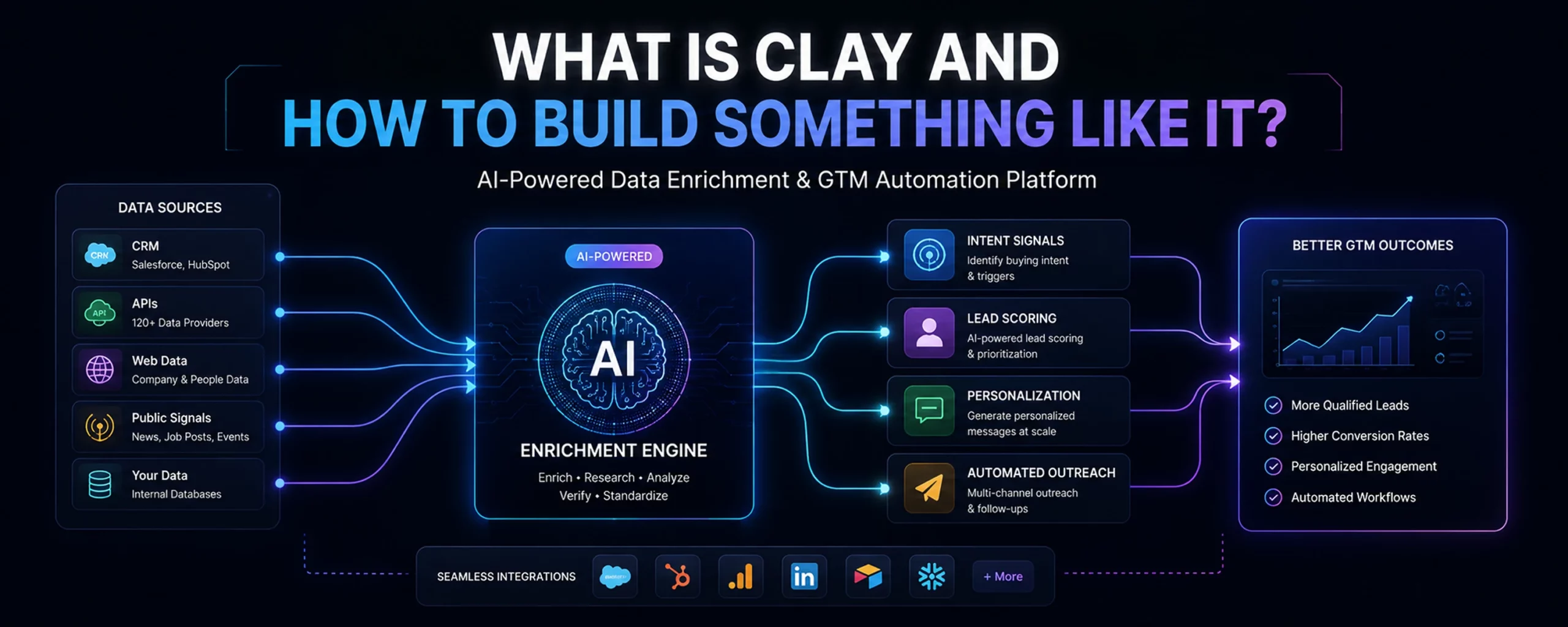
If you sell to businesses, you’ve probably heard someone say “just run it through Clay.” Clay AI is a go-to-market data platform that looks like a spreadsheet but behaves like a research team. It pulls contact and company data from more than 100 providers, runs it through AI agents, and hands back enriched, ready-to-contact leads.
This blog breaks down what Clay AI actually does, how it’s built under the hood, and what it takes to build something similar for your own team.
What Is Clay AI?
At its core, Clay AI is a programmable spreadsheet for sales and marketing teams. Each row represents a person or company. Each column runs a task: pull an email, check if it’s valid, summarize a company website, or draft a personalized opening line. Instead of switching between ten separate tools, teams run the whole workflow inside one table.
That single idea — a spreadsheet where every cell can call an API or an AI model — is why Clay AI has become a go-to for revenue teams. According to ZoomInfo’s breakdown of Clay, the platform’s appeal comes from consolidating dozens of data and AI vendors into one interface, cutting the tool-switching that slows down prospecting.
Before tools like this existed, a sales operations person might sign up for five or six separate data vendors. They’d export a CSV from one, upload it to another, and manually stitch the results together. Clay AI folds that entire chain into a single table, so the manual copy-paste work mostly disappears.
For teams considering similar approaches, the broader shift toward AI SDR technology shows how prospect research, qualification, and outreach are increasingly being combined into automated sales workflows.
How Clay AI Actually Works
Clay AI’s engine runs on four moving parts. Understanding them matters whether you’re evaluating the tool or planning to build your own version.
| Component | What It Does |
| Data aggregation layer | Connects to 100+ providers (Apollo, Clearbit, LinkedIn, etc.) to pull contact and firmographic data |
| Spreadsheet interface | A reactive grid where rows are records and columns are automated, asynchronous tasks |
| Waterfall enrichment | Queries data sources one by one until a valid result (like a verified email) turns up |
| AI agent layer | Uses large language models to read websites, summarize content, and draft outreach copy |
The waterfall step is worth calling out. Instead of paying for every provider on every lead, Clay AI tries the cheapest source first and only escalates if that source comes up empty. Clay’s own documentation describes waterfall enrichment as a way to query multiple providers sequentially while stopping once the required data is found. (Clay University)
The AI agent layer is what separates Clay AI from older enrichment tools. It doesn’t just pull static fields — it can visit a company’s website, read the “About” page, and generate a plain-English summary. That summary then feeds later steps, like scoring whether a lead is a good fit.
Teams building their own version can also study Clay’s enrichment documentation to understand how individual enrichment actions can be combined into larger workflows. (Clay University)

What Businesses Actually Use Clay AI For
Most teams don’t use every feature Clay AI offers. They pick two or three workflows and run them at scale. Common use cases include:
- Email and phone enrichment for lead lists that are missing contact details
- Email validation to protect sender reputation before a cold outreach campaign
- Company qualification using AI to read a website and flag whether it matches your ideal customer profile
- Signal-based prospecting, like scanning Glassdoor or Google reviews for complaints that match your product’s value prop
- Automatic list building through Google Maps or people-search for local or niche outreach
- CRM and outreach sync, pushing qualified leads straight into tools like Smartlead or HubSpot
Teams researching AI SDR agents tend to land on Clay AI specifically for its enrichment depth, then look elsewhere for the outreach execution layer.
The most useful workflows usually share one goal: turning raw prospect data into something a sales team can act on quickly. That might mean verifying contact details, identifying buying signals, or generating context for personalized outreach.
The value therefore comes less from having hundreds of individual features and more from connecting research, enrichment, qualification, and downstream sales activity.
Clay AI Pricing in 2026
Clay overhauled its pricing structure in March 2026. Existing customers on the old Starter, Explorer, and Pro tiers keep their legacy pricing. New signups land on a two-plan, usage-based system.
| Plan | Starting Price | What You Get |
| Free | $0/month | 100 Data Credits, 500 Actions, 200-row table limit |
| Launch | ~$185/month | Scalable Data Credits and Actions, access to Claygent AI agent |
| Growth | ~$495/month | Higher credit ceiling, unlimited actions, team collaboration features |
| Enterprise | Custom ($30K–$154K/year) | Dedicated support, Snowflake data engineering, SSO |
The catch most new users miss: Clay charges credits for failed lookups too. If three providers return nothing, you still pay for all three attempts. That’s a real cost driver worth budgeting for before you commit to a tier.
Pricing also becomes harder to estimate when workflows contain several enrichment steps. The number of providers, records, and repeated lookups can all influence the final cost.
For that reason, teams should model a realistic workflow before comparing subscription prices. A lower platform fee does not necessarily mean a lower total cost when enrichment volume is high.
How to Build Something Like Clay AI: A Technical Roadmap
If you’d rather build your own version than pay Clay AI’s enterprise rates, the architecture breaks into four buildable stages.
- Build the database and spreadsheet frontend. Use a data-grid library like TanStack Table or AG Grid for the interface. Pair it with a flexible backend database, such as PostgreSQL with JSONB columns, so each row can hold custom, dynamic attributes. PostgreSQL officially supports JSON and JSONB data types, making this approach practical for records with flexible fields. (PostgreSQL)
- Build the integration and waterfall engine. Create a modular service layer that connects securely to data vendor APIs. Then write queue logic, using something like BullMQ or Celery, that calls Provider A first and only falls through to Provider B if the first attempt fails or returns nothing.
- Add AI web-scraping agents. Connect an orchestration framework like LangChain or LlamaIndex to a headless browser tool such as Puppeteer or Playwright. This lets users write prompts that map to row data — for example, “visit this company’s About page and summarize its product in five words.”
- Build export and webhook triggers. Add bi-directional sync so enriched data flows into CRMs like HubSpot or Salesforce, or into outbound tools, without manual exports.
This is roughly the same pattern used in AI-driven GTM orchestration more broadly. A ZenML case study on GTM orchestration platforms documents similar architecture choices for teams building sales intelligence tools in-house. If you’re also weighing no-code options, it’s worth comparing this custom-build path against no-code AI workflow platforms like n8n and Zapier, which can replicate parts of this stack without a dedicated engineering team.
For teams considering broader automation, it also helps to understand how RPA and AI differ. RPA is generally process-driven, while AI can handle more data-driven reasoning and unstructured inputs. (IBM)
Build vs. Buy: What It Actually Costs
Before committing engineering time, it helps to see the real trade-off side by side.
| Factor | Build In-House | Buy Clay AI |
| Time to first workflow | 8–14 weeks (engineering-dependent) | Same day |
| Ongoing cost | Engineering salaries + API/vendor fees | $185–$495/month, scaling with usage |
| Maintenance | Your team owns every API change | Clay AI’s team owns it |
| Customization | Fully custom | Limited to Clay AI’s building blocks |
Building in-house makes sense if data enrichment is core to your product, not just your sales process. For most revenue teams, though, the calculus favors buying, since eesel AI’s analysis of Clay AI points out that most teams underestimate the ongoing maintenance cost of custom scrapers as data providers change their APIs.
It’s also worth understanding the difference between AI agents and RPA before you build, since teams often confuse the two and end up building something more rigid than they intended.
The decision ultimately depends on how much control your team needs. A custom system offers deeper control over data sources, workflows, interfaces, and integrations. A managed platform removes much of the engineering and maintenance burden.
If the goal is simply to improve sales productivity, teams may also benefit from learning how to automate SDR workflows with AI before committing to a larger custom build.
Where Isometrik AI Fits In
Clay AI is built for enrichment and list-building. It stops short of running full outreach campaigns, handling replies, or booking meetings on its own. That’s the gap Isometrik AI’s AI SDR is built to close — combining prospect research, personalized outreach, and reply handling in one system, without the credit-metering complexity Clay AI users often run into.
If your team is already exploring AI SDR agents as a next step after enrichment, that’s a natural place to pick up where a Clay AI workflow leaves off.
For organizations looking beyond individual enrichment workflows, sales automation software can provide a broader layer for connecting prospecting, outreach, follow-ups, and sales operations.
The right choice depends on where your biggest bottleneck sits. Clay AI can be a strong fit when enrichment and research are the priority. A broader AI sales system makes more sense when the goal is to automate what happens before, during, and after prospect engagement.